![HQ1.png]](https://knowledgebase.mmgfusion.com/hs-fs/hubfs/HQ1.png?height=40&name=HQ1.png)
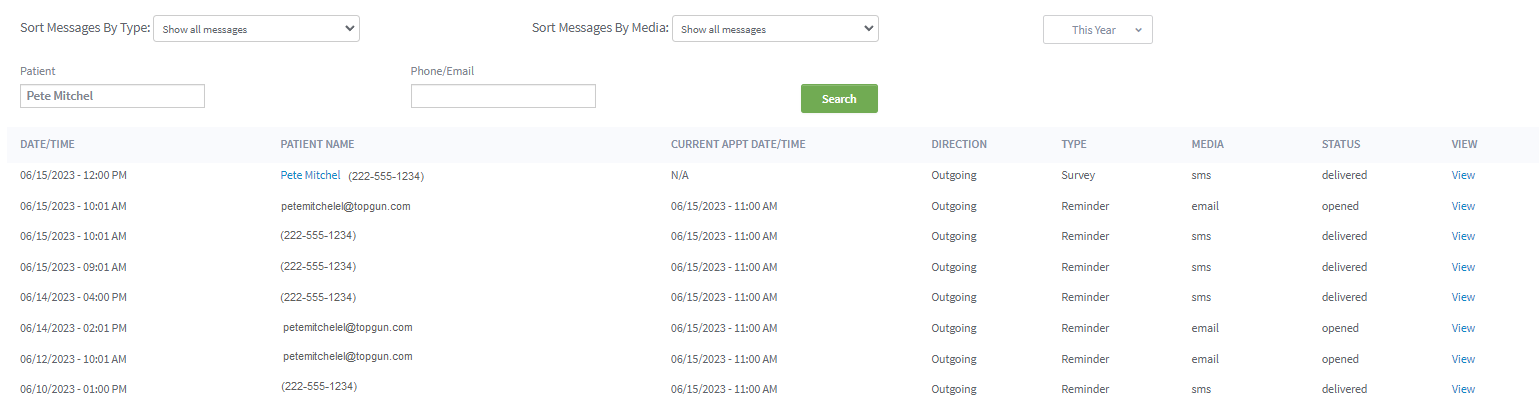
The Outbox keeps a record of every piece of communication and its details so you can easily see if your reminders, campaign, or other communication went out as planned.
Use the filters to:
- Sort by message type
- Sort by media
- Date
- Search fields (First, Last, Email or phone Number)

Results Review
-
- Date/Time: Date and time the communication was sent
- Patient Name: First and last name of the patient + E-mail or phone number
- Appt date/Time: Time of the appointment the communication was sent for, if applicable
- Direction: Outgoing if sent from MMG, Incoming if replied from the patient
- Type: Type of communication sent
- Media: E-mail, SMS, Phone
- Status: Delivered (went through) Bounced (Did not go through)
- View: Click to view the communication