![HQ1.png]](https://knowledgebase.mmgfusion.com/hs-fs/hubfs/HQ1.png?height=40&name=HQ1.png)
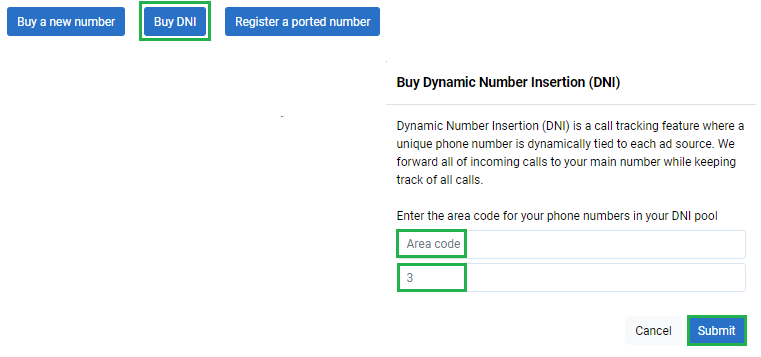
To acquire a DNI number, which should only be used to track the traffic of your website, visit Settings → Phone → Manage Numbers → click on “Buy a DNI number” and then enter the area code and the quantity of the phone numbers that you would like the pool to have, and the system will acquire the numbers for you.
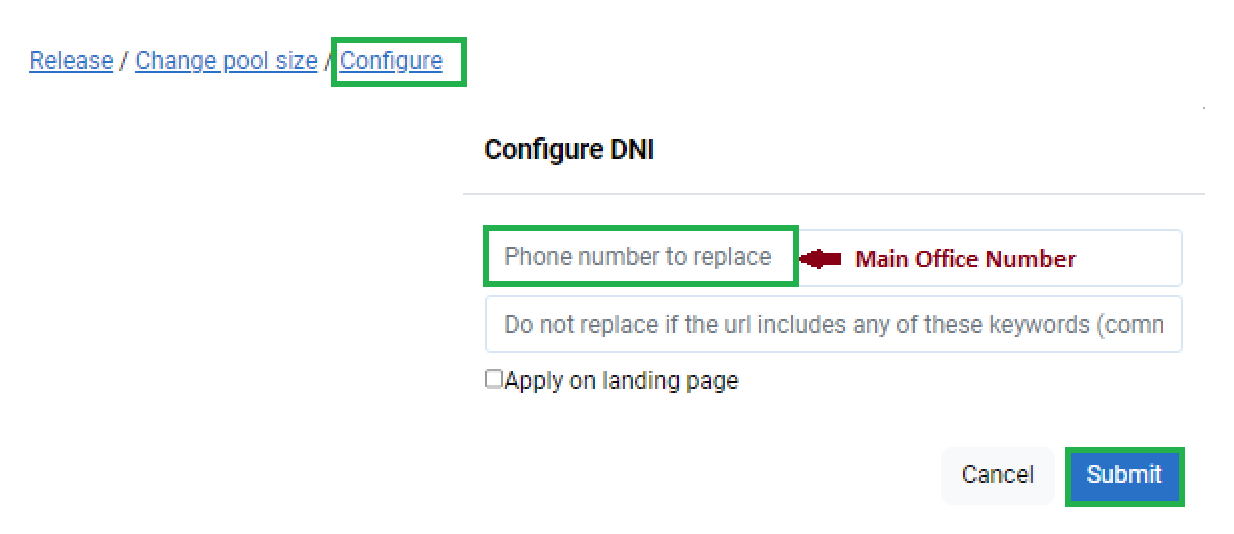
For DNI numbers, you also have to enter another setting that tells the system what number that DNI pool is replacing. This is the phone number that you have published on your website (usually, you office main phone number). The DNI script will detect that phone number on your website, replace it with a number in the DNI pool and then forward the phone calls to the original number.
Finally, you must place the DNI script on your website or landing page. The DNI script should be placed on any page the number you wish to replace (main office number) exists.
The script for the DNI can be found under Settings → Setup.
